
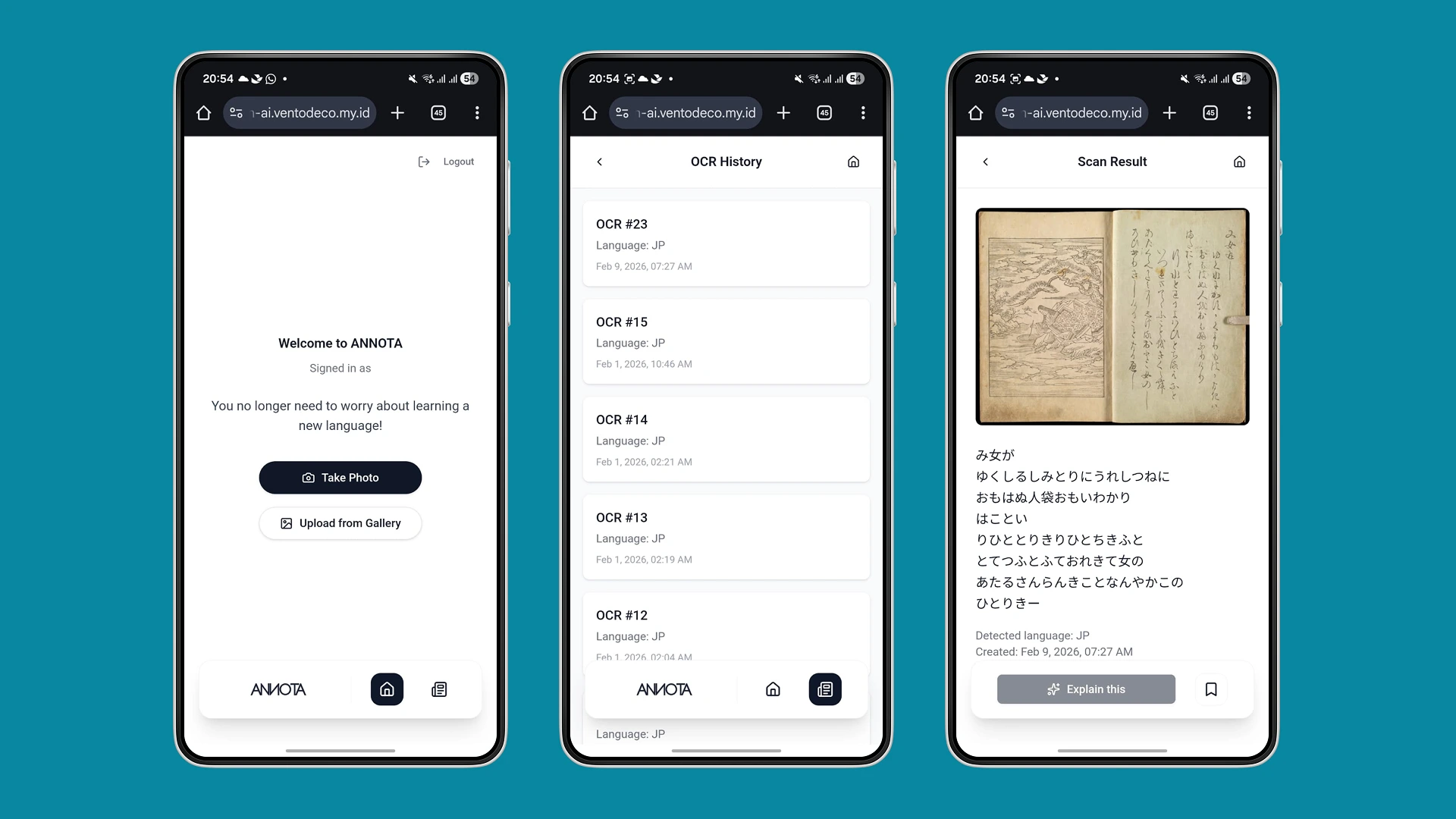
Annota is a lightweight web app that helps professionals and learners study Japanese directly from their physical books. By combining OCR, contextual annotations, and a simple mobile-first experience, Annota reduces the friction of jumping between printed material, dictionaries, and online references especially for users learning Japanese for work.
This project started as part of the Gemini 3 Hackathon – Scan & Learn Japanese, with a clear focus: validate whether people find it valuable to learn Japanese from photographed book content using OCR and contextual explanations.
People Behind The Annota
This project was built by a small cross-functional team with complementary strengths:
- Yosep Novento N – Software Engineer (Backend)
Yosep focuses on building a robust, scalable backend and ensuring smooth integration between the OCR engine, Gemini, and the web app. He is responsible for processing uploaded images, handling authentication and data storage, and turning raw image input into reliable, structured text and annotations that Annota can work with.
- Naufaldi Rafif S – Software Engineer (Frontend)
Naufaldi leads the frontend implementation and brings the product experience to life in the browser. He works on the mobile-first interface, page capture and upload flows, text highlighting interactions, and presenting annotation results in a fast, responsive way so users can scan, tap, and learn without friction.
- Anggita Satriya K – Product Designer
Anggita is responsible for the end-to-end product experience, from defining the core “scan–read–tap–learn” journey to crafting the visual design. He maps user needs, prioritizes features for the MVP, and ensures Annota feels simple and focused for professionals learning Japanese from physical books.
This core team is strongly supported by Denny Alfarisi, author of Shigoto Japan. His book serves as the primary reference and data source for shaping Annota’s learning context. Shigoto Japan is used as the main training material for Gemini, so that the AI can learn work-related Japanese and generate explanations, translations, and examples grounded in real professional scenarios. This collaboration helps Annota move beyond generic translation and deliver annotations that are practical, contextual, and relevant for learners using Japanese in their jobs.
For many Japanese learners, especially those using work-related materials (like Shigoto Japan), the most natural way to learn is still through physical books. But that comes with familiar pain points:
- Learners constantly switch between the book, dictionary apps, and browser tabs just to understand a single sentence.
- Looking up unfamiliar kanji or phrases is slow, especially for vertical or dense text layouts.
- Notes, translations, and explanations are scattered across screenshots, notebooks, or different apps, making it hard to revisit what they’ve learned.
- Most existing tools are optimized for generic translation, not professional context or repeatable learning from the same materials.
In short, there was no simple way to: take a photo of a page, turn it into text, tap on a phrase, and immediately get contextual explanations tailored for work situations then come back to those insights later.
Annota was designed to close that gap with a focused, MVP-first approach.
Discover
We mapped how Japanese learners use physical books for work related study, identified pain points around dictionary switching and scattered notes, and set key assumptions: mobile-first usage, Japanese → English focus, and Google-based sign-in.
Define & Scope
We framed the core value as: “scan a page, tap text, get contextual explanations, and save what matters.” From there, we locked the MVP around capture/upload, OCR, text highlighting, annotations, bookmarks, and history while explicitly excluding native apps, multiple languages, and advanced learning features.
Plan & Build
We split the two-week timeline into concrete milestones: PRD + flows, auth and upload, OCR integration, highlight + annotation output, bookmarks/history, and finally QA before release on Jan 20, 2026. This kept the team aligned on a shippable, vertical slice of the experience.
The Objective
The primary objective of the MVP was to validate the value of learning Japanese directly from photographed book content using OCR and contextual annotations.
More concretely, we aimed to:
- Enable fast conversion of book images into readable digital text.
- Help users understand Japanese words or sentences in a professional/work context.
- Allow users to save and revisit key annotations as part of their learning journey.
- Deliver a usable, testable MVP in two weeks, suitable for a hackathon timeline.
Product Design
Core Experience
The core Annota experience is designed as a mobile-first, "scan read tap learn" loop:
- App Entry & Sign-In
Users enter via a simple landing page and authenticate with Google OAuth. No extra accounts, no friction.
- Capture or Upload
Users can:
- Take a photo of a book page directly from the camera, or
- Upload an existing photo from their gallery.
- OCR Result Preview
The system converts the image into Japanese text. Users see a clean text view mapped from their page, and can scroll, skim, or focus on sections they don’t understand.
- Highlight & Annotation
Users tap and drag to highlight a word or sentence. Annota then displays:
- Meaning: direct translation.
- Usage example: sentences in professional/work context.
- Usage timing: when and in what situation the phrase is used.
- Word breakdown: explanation of each word in a sentence.
- Alternative meaning: different interpretations across fields or contexts.
- Bookmark & History
Users can:
- Bookmark specific annotations they want to revisit.
- Access Scan History to reopen previously uploaded pages and continue learning without starting from scratch.
- Language Preference
Explanations default to English, but users can adjust their preferred explanation language so the learning feels more comfortable.
Technology & Constraints
While the PRD leaves some implementation details open (e.g., exact OCR engine selection), it sets several important constraints and considerations:
- OCR Engine
Evaluating options such as Google Vision OCR or Open Tesseract for Japanese text recognition, including partial support for vertical text layouts.
- Annotation Generation
Exploring whether annotations will be fully AI-generated via LLMs with prompt constraints or supported by rule-based systems. For the MVP, the focus is on achieving reliable, fast responses rather than full linguistic coverage.
- Performance Targets
- Annotation response time: ≤ 3 seconds.
- OCR success rate: ≥ 85% for uploaded images.
- Optimized specifically for mobile web.
- Security & Reliability
- OAuth-based authentication for sign-in.
- Saved data persists across sessions for bookmarks and history.
- Upload size and storage policy (e.g., 5–10 MB per image, default persistence unless deleted) are defined as open questions to refine post-MVP.
These constraints help balance hackathon speed with a realistic path to production-ready quality.
From this MVP definition and build, we established how Annota can support Japanese learners in a focused, repeatable way:
- Learning directly from books becomes simpler
Instead of juggling dictionaries and screenshots, users can scan a page, get structured annotations, and build a personal knowledge base of saved explanations.
- Context matters as much as translation
By designing annotation output around meaning, examples, timing, and alternative uses, Annota goes beyond literal translation and moves closer to how phrases are used at work.
- History and bookmarks are core to learning
Treating annotations and scans as assets to revisit not just one-off lookups turns the app from a simple translator into a learning companion.
- Performance and UX are critical for trust
Targets like sub 3 second annotation responses and stable OCR are not just technical metrics; they directly impact whether users are willing to integrate Annota into their study routine.
- Clear scope keeps MVP shippable
Explicitly deferring native apps, multiple languages, and advanced features (like audio, grammar exercises, or social layers) allowed the team to deliver a coherent experience within a tight two-week window.
What’s Next
The MVP sets a strong foundation for future iterations:
- Expanding to more languages and content types beyond Japanese work materials.
- Improving OCR for vertical text and more complex page layouts.
- Exploring richer learning features such as spaced repetition, quizzes, or teacher-driven annotations.
- Refining storage policies and privacy controls for uploaded images and text.
Annota started as a hackathon experiment, but the underlying insight is broader: by bridging physical learning materials with AI-powered, contextual explanations, we can help more learners stay in flow, understand faster, and build long-term knowledge directly from the books they already use.